How to Do Norwegian 4x4 on Apple Watch
Use Ramp4x4 for a ready-made Norwegian 4x4 session, or create the intervals in Apple's Workout app. Set up four 4-minute work intervals with 3-minute easy recoveries between them, check your heart-rate target, and let the watch track the session. Here is how to prepare, start, and review it.
Published June 15, 2026Last updated October 28, 2026By Archline Labs LLCEditorial methodology
1. Set up Ramp4x4 before you exercise
- Install and open Ramp4x4 on your iPhone and paired Apple Watch. Complete the iPhone onboarding first. If the Watch app is missing, check the Watch app on your iPhone for available apps to install.
- Review the Health permissions. Allow the heart-rate access and workout-saving permissions you want to use when prompted. Check that the watch is fitted securely before relying on its live reading.
- Check your target in BPM. Review the target range shown in Ramp4x4 before starting. The heart-rate calculator can help you understand the range; its result does not automatically transfer to your watch. An age-based estimate is only a starting point.
- Review the session and coaching settings. Open the sliders control beside Start to check the warmup, four work intervals, recoveries, cooldown, and voice and haptic settings. Warmup and cooldown can be adjusted without a subscription; changing the interval structure requires Ramp4x4+.
For a treadmill workout, use the pace calculator to convert a familiar speed into your preferred units. It converts pace; it does not determine the speed that will produce your target heart rate.
2. Start on the watch and follow each phase
- Tap Start in Ramp4x4 on Apple Watch. Follow any permission or readiness prompts, then begin with the warmup shown on the watch.
- Use the current phase and countdown. During each 4-minute work interval, settle into an effort you can repeat across all four rounds. Use your heart-rate reading alongside how the effort feels.
- Ease off for each recovery. Follow the phase change and the 3-minute recovery countdown between work intervals. Voice and haptic cues depend on your coaching settings.
- Complete the final work interval and cooldown. Check the completion summary before leaving the app.
Follow phase changes from your wrist
The current phase and countdown tell you when to work, recover, and cool down. With coaching enabled, Ramp4x4 adds haptic taps and voice cues so you do not have to keep looking at the clock.
What the watch shows during the workout
- Clear phase changes. The screen switches to the current phase, with optional voice cues.
- Wrist cues. Enable haptics for a tap at interval transitions.
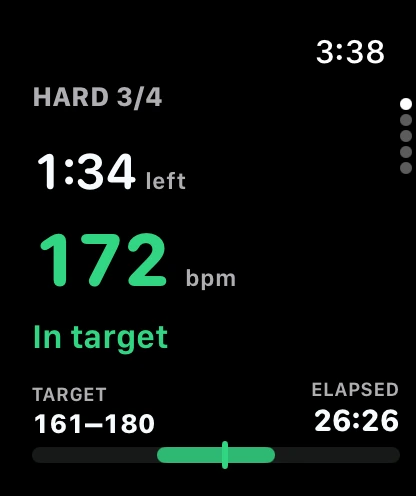
- Big countdowns. A large, glanceable timer for the phase you are in, readable mid-effort.
- Live heart-rate feedback. Your current heart rate against the target, so you can pace each interval.
- Target zone visibility. The 85 to 95% work zone and 60 to 70% recovery zone are right there.
- Voice cues. Spoken prompts for phase changes and pacing, so you can keep your eyes up.
Actual Apple Watch screen with sample workout data
3. Review your completed workout
When the session ends, you get a recap with your Total time, Avg HR, Peak HR, and measured time in target, plus a heart-rate curve over the whole workout. The watch saves the workout to Apple Health, and your iPhone keeps your history and VO2 max trends so you can see a training block add up over time.
Compare how consistently you completed the four intervals and how your heart rate changed across them. One hard session does not establish a VO2 max improvement.
How to use Apple's built-in Workout app instead
Apple's Workout app supports custom work and recovery intervals, warmup and cooldown periods, and heart-rate alerts. You can build the Norwegian 4x4 there without installing Ramp4x4. These steps follow Apple's current custom-workout instructions; controls may differ by watchOS version and workout type.
- Open Workout on Apple Watch and choose the activity you will do, such as Indoor Run.
- Open Goals, choose Custom, then tap the add control to create a workout.
- Add a warmup, then four Work intervals of 4 minutes with three Recovery intervals of 3 minutes between them. Add a cooldown after the fourth work interval.
- Name and save the workout. Review the interval order and any heart-rate alerts before starting it.
Ramp4x4 provides the 4x4 structure and its dedicated coaching screens together. Choose the approach you prefer; both can time the intervals. For a browser-only option, use the free 4x4 timer, which does not read your watch's heart rate.
Check the interval order before you press Start
A useful final check is the number of recoveries. Four work periods have three recoveries between them. A repeat block that includes recovery after every work period can accidentally add another recovery after the last effort.
| Part | Set | Total |
|---|---|---|
| Warmup | 10 minutes | 10 minutes |
| Three work/recovery pairs | 4 minutes work, then 3 minutes recovery, three times | 21 minutes |
| Final work period | 4 minutes work, without another recovery block | 4 minutes |
| Cooldown | 5 minutes | 5 minutes |
You can also enter each work and recovery step separately. Review the saved sequence, rather than assuming the repeat count gives the intended order. These durations illustrate a standard session; your saved warmup and cooldown settings may differ. Apple's custom-workout guide explains the available work, recovery and repeat controls.
Compare BPM, not just the zone name
Do not assume a watch's named Zone 5 has exactly the same boundaries as 85 to 95% of your maximum heart rate. Apple allows automatically calculated or manually edited zones. Check the actual BPM limits in the workout you are using, as described in Apple's Heart Rate Zones guide.
For an illustrative maximum of 200 BPM, the 85 to 95% work range is 170 to 190 BPM. This is an arithmetic example, not your personal target. Use the calculator to inspect your inputs, then check the chosen range in the app on your wrist. Calculator results do not automatically configure Apple Workout or Ramp4x4.
A rising heart rate does not restart the work clock. The original heart-rate analysis separates time completing an interval from recorded time in range. Its seven workouts are an N=1 observation, not a device-accuracy study.
Before you retry a workout
| What you see | First checks |
|---|---|
| No live heart rate | Check watch fit and the heart-rate permissions for the app you are using. Give the sensor time to acquire a reading. Do not raise effort to chase a missing number. |
| A late or erratic reading | Consider contact, motion, cold conditions and any external sensor connection. Apple's measurement guidance explains these limitations. A compatible Bluetooth monitor is an option, not a guarantee of perfect data. |
| No spoken or wrist cues | Review Ramp4x4 coaching settings, watch volume and the selected audio output. Use the visible phase and countdown as your reference. |
| The workout runs longer than expected | Check the saved warmup, cooldown and repeat order. Look for an extra recovery after the fourth work period. |
| A completed workout is missing | Check the completion screen, app history and Apple Health workout-saving permissions. If it remains missing, contact support with the workout time and device and app versions. |
After changing a setting, check it during a comfortable setup session before relying on it during hard exercise. This article update has not retested every Watch model or OS version.
Wrist heart rate and chest straps
Wrist heart rate can help guide your effort, but readings can lag or drop out during intervals. Check the watch fit and use the reading alongside how the effort feels. Our N=1 Norwegian 4x4 heart-rate dataset illustrates one person's sessions, not an accuracy study. A compatible Bluetooth heart-rate monitor is another option; see Apple's guidance on workout readings and external monitors.
Run 4x4 intervals on Apple Watch
Ramp4x4 is a guided Norwegian 4x4 timer for iPhone and Apple Watch. It calculates target zones, cues every phase with haptics and voice, shows live heart-rate feedback, and tracks your progress so you can keep your eyes up and just train.
Keep going
Apple Watch FAQ
Do I need an Apple Watch to do the Norwegian 4x4 with Ramp4x4?
Ramp4x4 is Apple Watch-first, and a paired Apple Watch runs the workout with live heart rate, haptics, and phase cues. The iPhone app handles onboarding, history, and your VO2 max trends.
How does Apple Watch tell me when a 4x4 interval changes?
The screen shows the current phase, countdown, and target zone. With voice and haptics enabled, Ramp4x4 also gives a spoken cue and a wrist tap at phase changes.
Is wrist heart rate accurate enough for intervals?
Wrist heart rate can help guide your effort, but readings can lag or drop out during intervals. Check the watch fit and use the reading alongside how the effort feels. A compatible Bluetooth heart-rate monitor is another option.